
At Mainstreet, membership helps you move forward—your way.
We make it easy to get in touch
Choose the way you'd like to Contact Us
You have a team of friendly experts here to help you in every way! It's easy to get in touch with us for answers to your questions and to get the support you need along your financial journey.
The best way to reach us is however you wish!
Want to drop by?
We'd love to see you! Just use our online scheduler to make an appointment at your nearest Mainstreet Credit Union branch in the Kansas City, MO/KS area.
Chat
Contact Mac, our friendly chat assistant, and connect with one of our representatives quickly for a convenient online chat.
Call
You can reach us at 913-599-1010 to speak with a team member during normal business hours.
Message Us
Send us a message and we'll get back to you shortly. For security purposes, do not provide sensitive information, like your account number or PIN, when using this form. If you need to share your personal information regarding your account, please send us a Secured Message within your OnlineAccess or call our Member Assistance Center at 913-599-1010 so that we may further assist you.
Keep your contact info current so we can send you important messages! It's easy to update your address, email and phone number:
Log in to Online Banking or Mobile Banking
Click on your photo or initials
Select the edit option next to the information you want to change
Make your updates and you're good to go
If you need some help or don't use Online Banking or Mobile Banking, you can call 913-599-1010 or visit one of our branches and we'll be more than happy to update your information.
To report a lost or stolen card, use the app or call 888-297-3416 (US) or 206-389-5200 (international).
Lock or unlock your card in seconds—right from the app or online banking. If your card is lost, stolen, or you spot something suspicious, simply lock it with a tap.
No phone call is needed to lock or unlock—just use the app for fast, secure control.
If you notice a transaction you don't recognize, lock your card immediately. To dispute a debit card transaction, submit your dispute through the Mobile App, Online Access, or by contacting the Dispute Phone Line at 855-651-7474.
Helpful Details
Mainstreet Talk is published quarterly via email.
To ensure you receive future emails, please make sure we have your preferred email on file. Simply log in to OnlineAccess to update your email address.
Whitelisting is a quick task to ensure the sender of an email gets added to the recipient’s safe senders list.
Here are simple instructions on how to ensure that our email lands in your inbox every time:
Gmail
Yahoo
AOL
Apple
Android
Gmail
Getting all future emails from a sender to appear in the “Primary” tab (instead of “Promotions”) is a quick, two-step process.
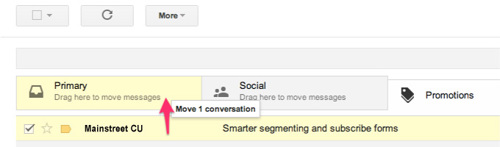
First of all, drag-and-drop the email message from beneath the tab it’s currently filed under, to the “Primary” tab:
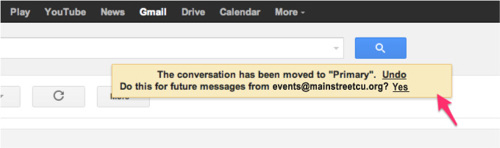
Once done, an alert will appear with, “This conversation has been moved to Primary. Do this for all future messages from [email protected]?” Select “Yes”:
Yahoo
When opening an email message, a “+” symbol should display next to From: and the sender’s name. Select this and an “Add to contacts” pop-up should appear. Select “Save”: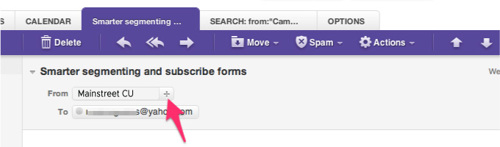
AOL
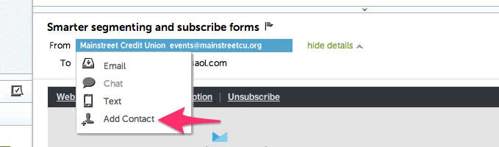
In the preview pane for an opened email message in AOL Mail, select the sender’s From name under the email’s subject line and select “Add Contact” from the drop-down menu:
Apple Mail
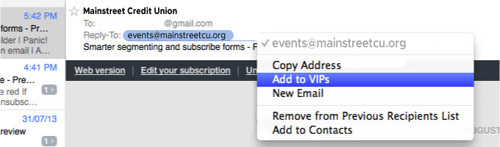
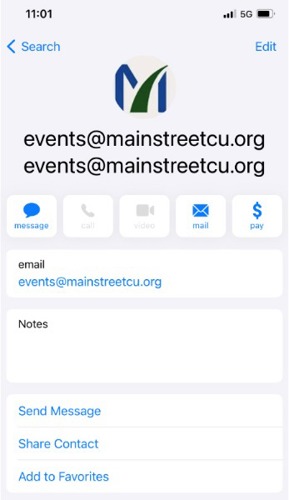
By selecting the From, or Reply-to on an email message, you can choose to “Add to Contacts” or “Add to VIPs.”
Android
On Android devices, open the email message and touch the picture of the sender that displays before the message. Tap “Add to Contacts.”
All Mainstreet branches will be closed on the following days.
2026
New Year's Day - January 1
MLK Day - January 19
President's Day - February 16
Memorial Day - May 25
Juneteenth - June 19
Independence Day - July 4*
Labor Day - September 7
Columbus Day - October 12
Veteran's Day - November 11
Thanksgiving Day - November 26
Christmas Day - December 25
*Holiday falls on a Saturday
**Holiday falls on a Sunday. Branches will be closed on the following Monday.
This problem has been experienced by some users. If a white screen only appears after clicking the access link, please press the "F5" key on your keyboard, or click the "Refresh" button on your web browser.
13001 W. 95th Street
Lenexa, KS 66215
301079183
You will be contacted through the e-mail address listed in your ‘Profile’.
You can place a stop payment on a lost or stolen check that has not yet been presented for payment by phone or at any branch.
By phone: Contact the Member Assistance Center
Branch: Stop by any branch location
Stop payments placed through the Member Service Center or at a branch are assessed a fee of $25 per request or $35 for a series of checks.
You will need to provide your 13-digit account number which differs from your member number. A 13-digit number is needed for all automatic clearing house (ACH) transactions. You can find this at the bottom of your checks. From left to right you will see our routing number, a separator symbol, then your 13-digit account number.
Automatic Loan Payments allow regular payments on a Mainstreet loan to be transferred from your checking or savings account. To set up automatic payments, call the Member Assistance Center or stop by any branch location.
OnlineAccess users may sign up for Mainstreet's Bill Payer service. Bill Payer provides flexible options for paying Credit Union loans and other businesses or individuals. Learn more.
You can use our mobile banking app, OnlineAccess through your PC, or PhoneAccess from a touch tone phone. You may also visit any branch or call our Member Assistance Center.
Visit our Become a Member page.
You can update your phone number or email address in mobile banking.
Log In
Click on the User Profile icon and click Settings
Click Edit next to your phone or email
Verify your password
Edit your contact information
Click Save
Phone and email updates will happen immediately. All address updates will be reviewed by a member service representative and you may be contacted for additional information.
There is no application fee for a pre-approval, however once a specific address is identified and before an appraisal is ordered, a $450 application deposit is collected. This application deposit is credited back at closing.
You can lock in an interest rate once we have the specific property address and are within 30-90 calendar days of a closing date. Locking commits Mainstreet to a specific interest rate for your loan. Rate locks are always done in writing with copies provided for the borrowers and Mainstreet. A roll-down fee to renegotiate your rate lock commitment is available.
Times are changing. As the economy evolves, the U.S. Department of the Treasury has announced it will stop producing the penny.
We are no longer able to order pennies from the Federal Reserve, which limits our ability to fill change orders that include them.
Rolls of pennies are no longer available at our branches.
Cash in your pennies sooner rather than later. While no official date has been set, there may come a time when Mainstreet will no longer accept pennies for deposit.
Expect rounding – we will round down to the nearest five cents.
Use digital payments – card and mobile transactions will continue to process to the exact cent and are not affected by rounding.
When closing an account, if your final balance includes 1–4 cents, the amount will be rounded down. You may request a cashier’s check for the exact amount or choose to donate the remaining cents to Children’s Miracle Network.
Click here to schedule an appointment.
All appointments can be made online using your smartphone, computer or tablet. Once you have scheduled the appointment, a confirmation email will be sent to the email address you provided.
Double check the browser you are using. To access Appointment Concierge with ease, Mainstreet members should use the Google Chrome browser. You can download Google Chrome here.
If you are experiencing difficulties with Appointment Concierge, you can also contact our Member Assistance Center at 888-395-1010.
Appointments can be made as quickly as 1 hour in advance and looking up to 2 weeks out in the calendar. Some appointments are available by phone or in-person, while others are phone-only appointments.
Services available
CARD SERVICES
Get assistance with ATM, Debit or Credit Cards
NEW ACCOUNTS
Open a new membership
Open a savings, checking, IRA, Youth or Business account
LOANS & MORTGAGES
Purchase or finance vehicles, Harleys, ATVs or motor homes
Meet with a representative to borrow money for nearly any purpose
Apply for a Mastercard® credit card and borrow money as you need it
Discuss options to borrow against your home’s equity
Discuss your business lending needs with a representative
OTHER FINANCIAL NEEDS
Schedule a call or in-person appointment to update your account information
Get help accessing your online account, mobile app or other online features
Make an appointment to get your business or personal documents notarized
Transfer money to an individual or entity
Place a stop payment on a single check, ACH or a series of checks
Schedule time to access your safe deposit box
You can cancel or reschedule your appointment from the confirmation email you received.
You can choose a specific representative to meet with if there is one you’re more familiar with.
Bring any documents that you may need for your appointment.
Parking looks a bit different at each branch so look for any signage that helps guide you to the right location for parking.
When you arrive, someone will be available to help check you in when you arrive.
In some cases, the card involved in a dispute may need to be closed. If that happens, just contact us and we'll get you a new one, either an instant-issue card at a branch or a replacement mailed to you.
If our dispute department determines a fraudulent charge is valid, any overdraft fee caused by that charge will be refunded. Overdraft fees caused by other transactions while funds were unavailable are not refunded.
Yes. Beginning July 27, 2026, fraud alerts can be delivered via SMS/text message so you can quickly verify suspicious activity.
Important: A travel notice does not eliminate all fraud monitoring. If suspicious or unusual card activity is detected while you're traveling, you may receive a fraud alert text asking you to verify a transaction. These alerts help protect your account and ensure legitimate purchases can be processed as quickly as possible. Fraud alert text messages are sent 24/7 from 2WC using short code 96923. We recommend saving 96923 in your contacts so you can quickly recognize and respond to fraud alerts.
Spoofing is when a caller deliberately falsifies the information transmitted to your caller ID display to disguise their identity. Scammers often use neighbor spoofing so it appears that an incoming call is coming from a local number or spoof a number from a company or a government agency that you may already know and trust. If you answer, they use scam scripts to try to steal your money or valuable personal information, which can be used in fraudulent activity.
https://youtu.be/PS3llQfRLD8 (Opens in a new window)
Reminder:
Mainstreet Credit Union will NOT contact you requesting you to share account information. Fraudsters can spoof real numbers (including your credit union’s phone number), and falsely claim that there has been potential fraudulent activity on your account, in an attempt to scare you into providing your account information.
If you are contacted by someone asking you to provide passwords or any information that appears on your debit, ATM, or credit card (such as card number, CVV number, expiration date, etc.), DO NOT share anything with them. HANG UP IMMEDIATELY. Remember these fraudsters can mask phone numbers and make it appear as though they are calling from a valid number, even a Mainstreet Credit Union number. If you are unsure whether the representative calling you is from Mainstreet Credit Union, hang up and contact us at 913-599-1010 or toll-free 888-395-1010 or stop by a branch so we can review your account activity with you.
Make the switch. Make progress.
Take advantage of exclusive member offers
View our current specials.
Read real experiences from fellow members
View member success stories.
Fuel the growth of your community
View our community impact.
Quick Budget Tip
Try the 50/30/20 split. Spend 50% on needs, 30% on wants, and 20% on savings.